
Separate an Extension Like .wav from Item Name with Reaper Script
In previous posts we explored how to display information to help trace what’s going on as we work on the code, then we saw how to use statements from the ReaScript API to get a media item name.
Now let’s separate the name “Dialogue 007” and the extension “.wav” into their own variables. It’s possible there is more than one period in an item name. So to get to the file extension with some accuracy, we want to find the last period in the full_take_name from left to right. We could write it like this:

This section uses several general Lua statements, the first two are:
< for count = start , end do block end >
< string.len (string) >
The for statement is referenced in Lua 5.4, section 3.3.5. We’re creating a loop that incrementally counts. The variable i is used in the for statement to keep track of the count. The count starts at i = 1, and continues until i = string.len(full_take_name). The statement string.len returns the total number of characters in the string. In our example, the variable full_take_name contains “Dialogue 007.wav” which is 16 characters long. So our for loop will start at 1, and terminate at 16. Everything between do and the second end gets repeated inside the loop.
< if (expression) then block end >
The if statement is detailed in Lua 5.4, section 3.3.4. We use the if to do something, or not, depending on the evaluation of the expression. In this case, if there is a period, the code between then and the first end is executed. If there is NOT a period, the code between then and the first end is ignored.
< string.find (string, pattern, starting character number, plain boolean) >
We check for the period using string.find. All three of the string statements are detailed in Lua 5.4, section 6.4. The statement string.find returns a set of indices, which are the character locations for the beginning and ending of the pattern. In our case, there’s only one character in the pattern, and we only evaluate the first index, with we compare against the value of i. The expression string.find(full_take_name, “.”, i, true) == i will be true or false, and is used by the if statement.
There are four parameters inside the parentheses of string.find. The first is the string in which we are finding, which is our value stored in full_take_name. The second parameter is a search pattern, which in this case is simply a period enclosed by quotation marks. The third parameter is optional, and crucial for using the counting loop to narrow down the last occurrence of period. It defines the starting character position inside the string we are searching. We use the counting variable i to search starting at the first character, then starting at the second character, then third, until we get to the final, sixteenth character. The fourth parameter is also optional, and is false if left blank. But we use true here because we want to evaluate an actual period, not a wildcard represented by a period.
As i increments in the for loop, string.find first evaluates if there is a period at i in “Dialogue 007.wav”, which is false. Then i increments and it evaluates if there’s a period at i in “ialogue 007.wav”, which is also false. This continues (“alogue 007.wav”, “logue 007.wav”, etc.) until it evaluates “.wav” which is true, because i is 13 and string.find returns an index of 13. After that, “wav” does NOT contain a period at i, so the value becomes false again, and the code between then and the first end is ignored again.
If the substring contained a period at location i, the variable take_name_end was assigned the value of i. So when i was 1, and the substring was “Dialogue 007.wav”, the variable take_name_end remained 0. When i was 2, and the substring was “ialogue 007.wav”, take_name_end remained 0. But when i was 13, the string.find of “.wav” evaluated the “.” at the starting index of 13 in full_take_name, so the then clause executed take_name_end = i, thus take_name_end was assigned 13.
After that the substring was “wav”, there was no period, so take_name_end remained 13, because take_name_end = i was ignored in the then block. And when i was 15 and 16, take_name_end still remained 13. The for loop ends at i = 16, with take_name_end equalling 13, the character location of the last period in “Dialogue 007.wav”. Having reached the end of the count, we exit the for loop at the second end.
The string.sub statement allows us to use the location of the last period, stored in the variable take_name_end to separate the take name from the extension. The format is:
< string.sub (string, starting character number, ending character number) >
And we can code the separation of the take name and extension like this:

In both variables take_name and take_ext we’re wanting a substring from the variable full_take_name, which is the string we use in the first parameter of the two lines of code, above. The second parameter is the location start of the substring, with the third parameter being the location of the end of the substring. So the take name with no extension starts at 1, and ends at full_take_name – 1. The extension starts at take_name_end, which is 13 is our example. The third parameter is optional, and when omitted in the take_ext line, defaults to the full length of the string in the first parameter, which is 16 in our example.
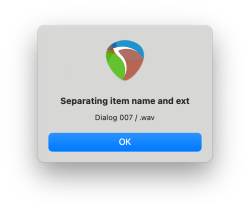
If we execute reaper.MB (take_name .. ” / ” .. take_ext, “Separating item name and ext”, 0), the following is displayed:

In the next post we get the file name associated with the item, and separate it into parts.
POSTS IN THIS SERIES
Beginner’s Guide to Reaper Script
Get Item Name with Reaper Script
Separate an Extension Like .wav from Item Name with Reaper Script (you are here)
Get File Name with Reaper Script
Rename File with Item Name including Version Control in Reaper Script (pending…)


3 Comments
Leave a CommentTrackbacks