
Get File Name with Reaper Script

In previous posts we wrote Lua code to trace what’s happening, obtained a media item name, and separated an extension (“.wav”). Let’s use what we’ve learned to obtain a media file name.
When we got the media item name, we started with the media item identifier. But because a media item can contain more than one take, we used the item identifier to get the active take identifier, which connected us directly to one, and only one, media file. We named that variable take, and we need to use it again for that connection to the media file.

As with getting the item and takes, the statement reaper.GetMediaItemTake_Source returns an identifier, not a string of characters. The statement reaper.GetMediaSourceFileName uses the identifier to get the string of characters that spell out the file name.
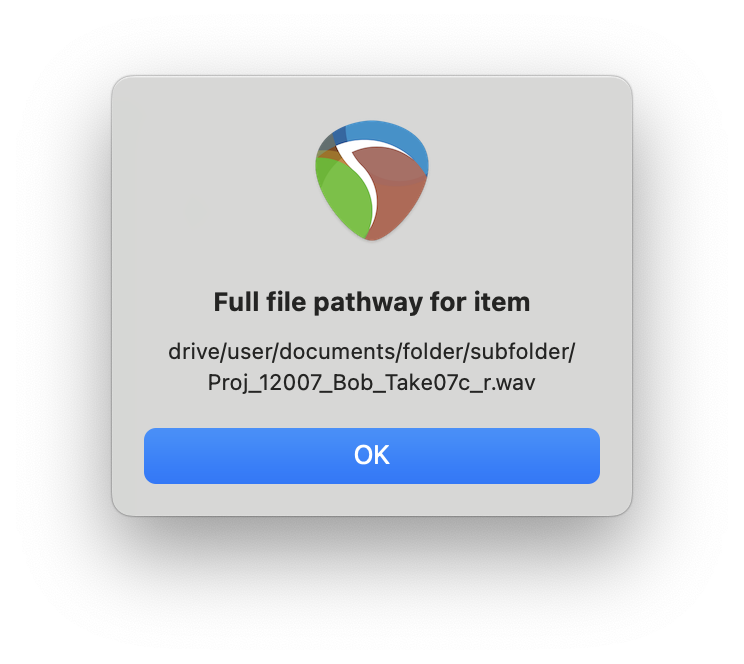
The operating system stores media files on the hard drive in a folder structure. What we have retrieved is the whole file pathway, not just the file name. If we execute reaper.MB (pathway, “Full file pathway for item”, 0), the display might look something like this:
Let’s separate the file path, file name, and extension. To isolate the file path we can use a for loop to find the character position of the last slash.
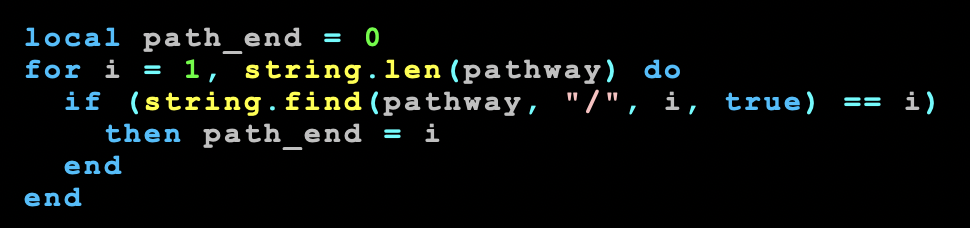
Just like when we previously found the last period, we start counting character positions at 1, and increment until the string.len of pathway. In our example above that’s 66. The string.find equals i evaluation will be true in the if statement at positions 6, 11, 21, 28, 38, where the then path_end = i is executed. After 38, (string.find(pathway, “/”, i, true) == i) will evaluate as false, so path_end will equal 38 when the for loop ends at 66.
Now that we know where the file path ends, let’s use another for loop to find the last period, the character that separates the file name from the extension. We could start testing for period at the first character position in pathway, but the last period should be after the end of the file path. So we can for loop from path_end to the string.len of pathway. In this case, we loop from 38 to 66.
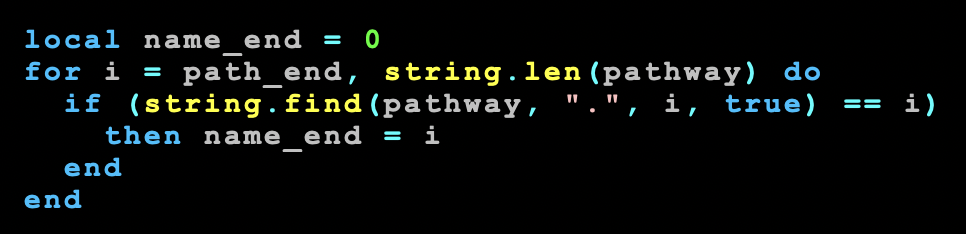
That last period is at character position 63, so that value gets stored in the variable name_end. With the variables path_end and name_end evaluated, we can use string.sub again to pull out the name and extension from pathway.
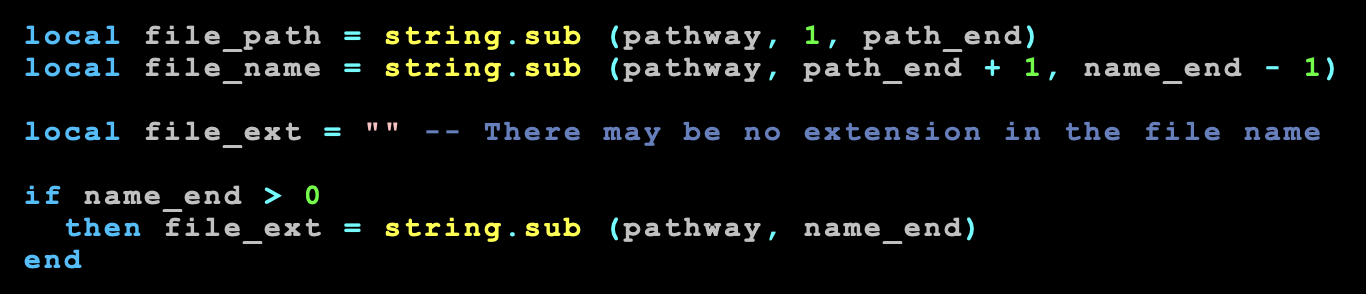
In our earlier block of text, right before the for loop, we assigned name_end = 0. If there was no period anywhere in pathway, if would be false for every value of i, and name_end would never increment, remaining zero. So the test if name_end > 0 allows us to update file_ext from “” to “.wav” because we know at least one period was used in pathway. Otherwise there is no period, thus no file extension, so file_ext would remain empty.
If we code a display message reaper.MB(file_path .. “\n\n“ .. file_name .. “\n\n“ .. file_ext, “Pathway parsed:”, 0) we will generate a message box that looks like this:

Having separated these component parts, we could write code to use a media item name to update the file name. With some effort, we could check to see if our updated file name already exists, and slap an incremental number on the end of that file name to generate a unique file name for version control.
POSTS IN THIS SERIES
Beginner’s Guide to Reaper Script
Get Item Name with Reaper Script
Separate an Extension Like .wav from Item Name with Reaper Script
Get File Name with Reaper Script (you are here)
Rename File with Item Name including Version Control in Reaper Script (pending…)
 Randy Coppinger
3 Comments
Leave a CommentTrackbacks